Filling a gap in Istanbul coverage
I’m at no loss for blog material, but have been short on time (that’s not going to change, so I’ll need to tweak priorities). But…I wanted to write something a bit different from normal in case anyone else ever needs to solve this specific problem (or if anyone else knows that this problem already has an even better solution).
Our team uses a tool called Istanbul to measure code coverage. It generates a report that looks sort of like this (minus the privacy scribbling).
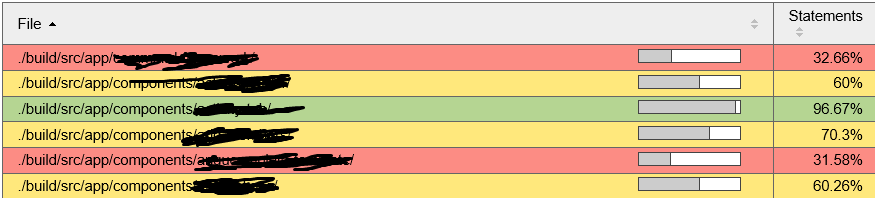
For those who don’t know me, I feel compelled to once again share that I think Code Coverage is a wonderful tool, but a horrible metric. Driving coverage numbers up purely for the sake of getting a higher number is idiotic and irresponsible. However, the value of discovering untested and unreachable code is invaluable, and dismissing the tool entirely can be worse than using the measurements incorrectly.
The Missing Piece
Istanbul shows all up coverage for our web app (about 600 files in 300 or so directories). What I wanted to do, was to break down coverage by feature team as well. The “elegant” solution would be to create a map of files to features, then add code to the Istanbul reporter to add the feature team to each file / directory, and then modify the table output to include the ability to filter by team (or create separate reports by team).
I don’t have time for the elegant solution (but here’s where someone can tell me if it already exists).
The (or “My”) Solution
This seems like a job for Excel, so first, I looked to see if Istanbul had CSV as a reporter format (it doesn’t). It does, however output json and xml, so I figured a quick and dirty solution was possible.
The first thing I did was assign a team owner to each code directory. I pulled the list of directories from the Istanbul report (I copied from the html, but I could have pulled from the xml as well), and then used excel to create a CSV file with file and owner. I could figure out a team owner for over 90% of the files from the name (thanks to reasonable naming conventions!), and I used git log to discover the rest. I ended up with a format that looked like this:
app.command-foo,SomeTeam
app.components.a,SomeTeam
app.components.b,AnotherTeam
app.components.c,SomeTeam
app.components.d,SomeOtherTeam
Then it was a matter of parsing the coverage xml created by Istanbul and making a new CSV with the data I cared about (directory, coverage percentage, statements, and statements hit). The latter two are critical, because I would need to recalculate coverage per team.
There was a time (like my first 20+ years in software) where a batch file was my answer for almost anything, but lately – and especially in this case – a bit of powershell was the right tool for the job.
The pseudo code was pretty much:
- Load the xml file into a PS object
- Walk the xml nodes to get the coverage data for a node
- Load a map file from a csv
- Use the map and node information to create a new csv
Hacky, yet effective.
I posted the whole script on github here.